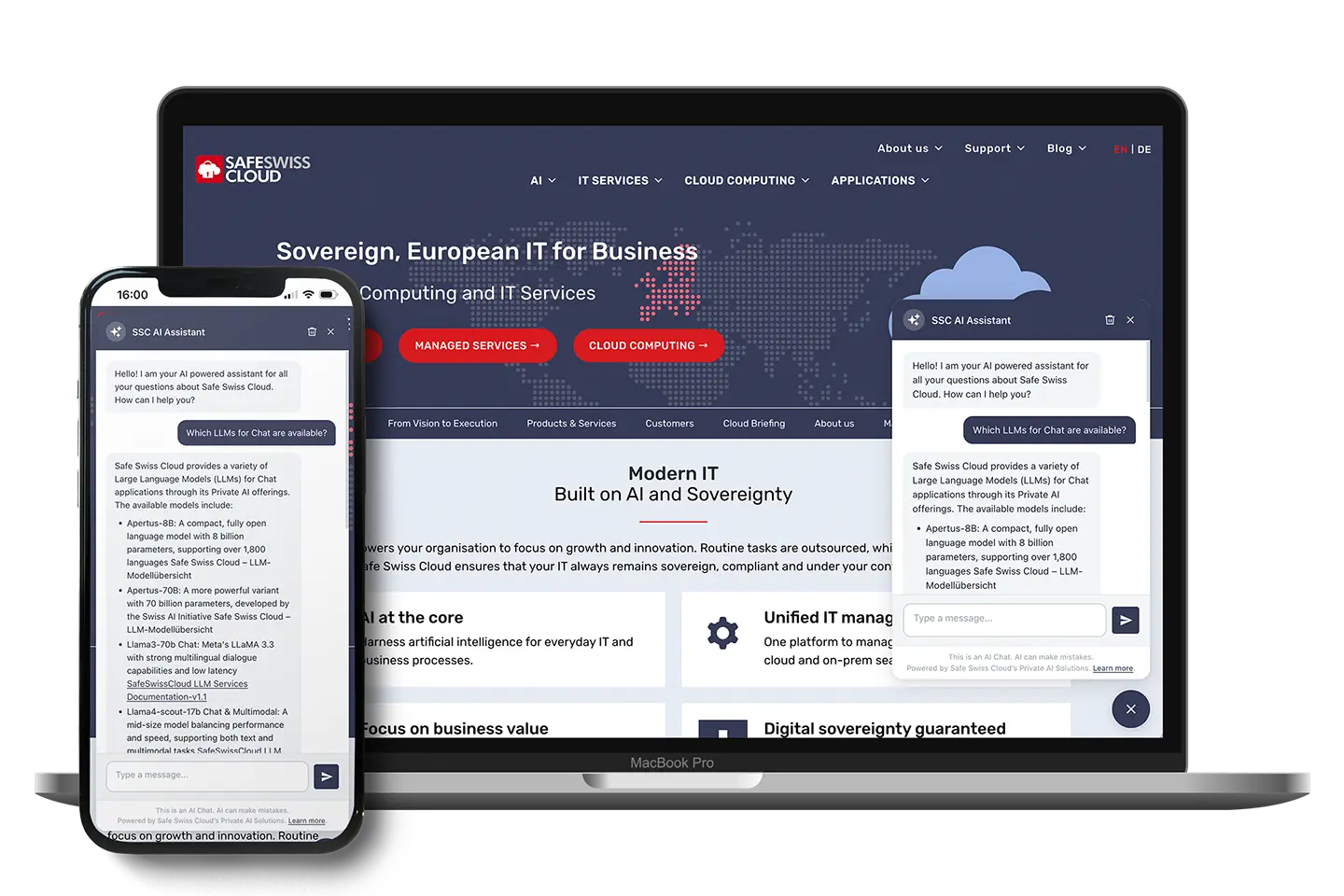
Das Projekt hatte eine klare Anforderung: Ein KI-Chatbot für eine WordPress-Website, der ausschliesslich auf Schweizer Infrastruktur läuft. Der AI-Provider ist Safe Swiss Cloud Private AI – ein OpenAI-kompatibler Endpoint, der auf Servern in der Schweiz betrieben wird. Der Chatbot soll auf den Inhalt der Website eingehen, mehrsprachige Besucher korrekt bedienen, und sich nahtlos in WordPress integrieren.
Das Problem mit «einfachen» Chatbot-Lösungen
Die meisten fertigen Chatbot-Lösungen im WordPress Plugin Repository sind aus Datensicht ein schwarzes Loch und funktionieren zwar meist schnell, aber nur über die APIs der bekannten großen AI-Anbieter wie OpenAI, Anthropic oder Google. Darüber hinaus sind sie meist unflexibel. Für Unternehmen mit europäischen Kunden und DSGVO-Pflichten ist das ohnehin problematisch. Und für ein Schweizer Cloud-Unternehmen, das für «Ihre Daten bleiben in der Schweiz» steht, ist so eine Lösung schlicht unmöglich.
Safe Swiss Cloud betreibt mit Private AI einen eigenen KI-Dienst auf Schweizer Infrastruktur. Modelle laufen auf Servern in der Schweiz, unter Schweizer Datenschutzrecht, ohne Weitergabe an Dritte. Was fehlte, war ein WordPress-Plugin, das diesen Dienst sauber in die bestehende Website integriert – und dabei nicht nur «irgendwie funktioniert», sondern wirklich auf den Inhalt der Website eingeht.
Das Ergebnis – das WordPress-Plugin (wp-ai-chatbot, Version 1.1.1) – stelle ich hier in seiner Architektur vor. Vorerst wird es als proprietäres Plugin weiterentwickelt, damit man spezifische Anforderungen exakt abbilden und es für andere Projekte und Use Cases anpassen kann – bei Interesse bitte einfach kontaktieren.
Plugin-Architektur im Überblick
wp-ai-chatbot/
├── wp-ai-chatbot.php              # Entry point, constants, autoloaders
├── includes/
│   ├── Admin/
│   │   ├── Settings.php           # Settings page (5 sections, Settings API)
│   │   └── Updater.php            # Self-hosted auto-update via downloads.netzkundig.com
│   ├── Chat/
│   │   ├── AI_Adapter.php         # Provider abstraction (SDK → direct API fallback)
│   │   ├── Frontend.php           # Widget rendering & wp_localize_script
│   │   ├── Language_Detector.php  # 3-layer language detection
│   │   └── REST_Controller.php    # Public + admin REST endpoints
│   └── Content/
│       ├── Indexer.php            # RAG: MySQL FULLTEXT + pgvector integration
│       ├── Vector_Search.php      # Semantic search via PostgreSQL pgvector
│       └── Knowledge_Base.php    # Private CPT for custom knowledge entries
└── assets/
    ├── css/chat-widget.css        # CSS custom properties, typing effect
    └── js/chat-widget.js         # Vanilla JS, kein Framework, kein Build-Step
Es gibt keine Frontend-Build-Pipeline, kein React. Stattdessen verwenden wir Vanilla JavaScript, CSS Custom Properties, das WordPress-native REST API und das Settings API. Wir setzen PHP 8.1+ und PSR-4-Autoloading mit spl_autoload_register ein.
Provider-Abstraktion: OpenAI-kompatibles Interface als gemeinsamer Nenner
Das Herzstück ist AI_Adapter.php, der einen 3-stufigen Fallback implementiert:
1. WP AI Client SDK  (kommt mit WordPress 7.0+)
   ↓ nicht verfügbar?
2. PHP AI Client SDK  (via Composer)
   ↓ nicht verfügbar?
3. Direkter wp_remote_post() call
   (OpenAI / Anthropic / Google / Mistral / Custom endpoint)
Safe Swiss Cloud Private AI ist als Custom-Endpunkt konfiguriert – eine URL, die das OpenAI Chat Completions API-Format implementiert (POST /v1/chat/completions). Das Plugin sendet:
{
  "model": "configured-model-name",
  "messages": [
    { "role": "system",    "content": "Systemanweisung mit RAG-Kontext" },
    { "role": "user",      "content": "Vorherige Frage" },
    { "role": "assistant", "content": "Vorherige Antwort" },
    { "role": "user",      "content": "Aktuelle Frage" }
  ],
  "temperature": 0.7, // in Settings anzupassen
  "max_tokens": 1024  // in Settings anzupassen
}
Der API-Key wird AES-256-CBC-verschlüsselt gespeichert (WordPress auth salts als Key), erscheint nie im Frontend-HTML oder JavaScript.
RAG & Knowledge Base: Wie Website-Content und privater Content in den Kontext kommen
Neben dem automatisch indizierten Website-Content gibt es einen zweiten Kanal für Kontextwissen: ein privates Custom Post Type (wpaic_knowledge), das im WordPress-Backend unter dem Settings-Menü gepflegt wird und für Frontend-Besucher nicht zugänglich ist.
Einträge werden mit dem normalen WP Editor (Titel + Content) erstellt oder via .txt-File-Upload importiert. Sie werden unabhängig von der «Index Post Types»-Einstellung immer vollständig indexiert und eingebettet – inklusive pgvector-Embedding auf save_post.
Wichtiges Verhalten: Antworten zitieren diese Einträge nie mit einem Link. Der Content dient ausschliesslich als Kontextwissen für präzisere Antworten – interne FAQs, Produkt- oder Preisdetails, Support-Informationen – ohne dass diese Inhalte öffentlich zugänglich werden. Das wird sowohl über den System Prompt als auch über eine JS-seitige Filterregel im Markdown-Renderer durchgesetzt.
Indexierung
Content wird in {prefix}wpaic_index (MySQL) gespeichert – aufgeteilt in ~500-Wort-Chunks mit 50-Wort-Overlap. Auf der Tabelle liegt ein MySQL FULLTEXT-Index. Hooks:
save_post→ Auto-Reindex des betroffenen Postsdelete_post/trashed_post→ Auto-Entfernung aus dem Index- Manueller Batch-Reindex via
POST /wpaic/v1/reindex(10 Posts/Batch, AJAX-Progress)
Hard limit: 300.000 Zeichen pro Post. FULLTEXT-Index wird nur beim manuellen Reindex erstellt, nie beim Page Load (FastCGI-Timeout-Prävention).
Retrieval-Pipeline
User-Anfrage
    │
    ▼
Language Detection
    │
    ▼
Priority-Chunks (is_priority=1) → immer im Kontext
    │
    ▼
FULLTEXT-Suche (sprachpräferierend)
    │  < 50 % der Slots gefüllt?
    ▼
Auffüllen mit anderssprachigen Chunks
    │  pgvector Hybrid Mode aktiv?
    ▼
Semantic Results füllen verbleibende Slots
    │
    ▼
Top-N Chunks → System Prompt
    │
    ▼
AI generiert Antwort mit Inline-Quellenlinks
Fallback-Logik: Wenn FULLTEXT keine Ergebnisse liefert (kurze Queries oder eingeschränktes Hosting), wird automatisch auf LIKE-Suche zurückgegriffen.
Semantic Search: pgvector als optionale Erweiterung
Der wichtigste Grund für eine separate PostgreSQL-Datenbank: MySQL hat keine praxistaugliche Implementierung für Approximate Nearest Neighbor (ANN) Search über Vektoren. pgvector bringt vector(N)-Spaltentyp, Cosine-Distance-Operator (<=>) und IVFFlat-/HNSW-Indizes mit.
Das Plugin erstellt automatisch:
CREATE TABLE {prefix}wpaic_vectors (
    id         bigserial PRIMARY KEY,
    chunk_id   bigint NOT NULL UNIQUE,
    post_id    bigint NOT NULL,
    embedding  vector(N) NOT NULL,
    indexed_at timestamp NOT NULL DEFAULT NOW()
);

CREATE INDEX ON {prefix}wpaic_vectors
    USING ivfflat (embedding vector_cosine_ops) WITH (lists = 100);
Verbindung über PHP pdo_pgsql – kein PHP FFI, keine nativen Libraries, keine kompilierten Modelle. Funktioniert auf Shared Hosting, solange pdo_pgsql aktiviert ist.
Embedding-Provider ist unabhängig vom Chat-Provider
Chat und Embeddings sind vollständig getrennt. Konfigurierbare Kombinationen: z.B. Private AI für Chat + OpenAI text-embedding-3-small für Embeddings, oder ein Custom Embedding Endpoint. Built-in Dimensionen:
| Modell | Dimensionen |
|---|---|
text-embedding-3-small (OpenAI) | 1536 |
text-embedding-004 (Google) | 768 |
mistral-embed | 1024 |
| Custom (OpenAI-compatible) | frei konfigurierbar |
Such-Modi
- Hybrid: FULLTEXT zuerst, pgvector füllt verbleibende Kontext-Slots auf
- Vector only: ausschliesslich semantische Suche
- Graceful degradation: Alle Vector-Methoden geben
[]/falsezurück, wenn PostgreSQL nicht erreichbar ist → automatischer FULLTEXT-Fallback, ohne Fehlermeldung
Mehrsprachigkeit: 3-Layer Detection
User-Nachricht
    │
    ▼
Unicode Script Detection
(CJK, Kyrilisch, Arabisch, Hebräisch, Thai, Devanagari)
    │ Latin Script?
    ▼
Stopword Matching
(DE, EN, FR, ES, IT, NL, PT, PL)
    │ unsicher?
    ▼
Browser Locale (Accept-Language Header)
    │ nicht verfügbar?
    ▼
Plugin-Default-Sprache
Die sprachpräferierende RAG-Suche füllt Kontext-Slots zunächst aus dem Content der erkannten Sprache. Sind weniger als die Hälfte der Slots gefüllt, werden Chunks aus anderen Sprachen ergänzt – sinnvoll für teilweise übersetzte Sites.
WPML/Polylang-Integration: Beim Indexieren wird wpml_permalink angewendet, damit gespeicherte URLs immer Sprach-Slug und vollständige Parent-Page-Hierarchie enthalten (z.B. /de/faqs/private-ai/slug/ statt /slug/).
REST API
Öffentlich (rate-limited: 30 req/min per IP-Hash):
POST /wp-json/wpaic/v1/chat
GET  /wp-json/wpaic/v1/status
Request-Body für /chat:
{
  "message": "Wo werden meine Daten gespeichert?",
  "history": [...],
  "locale": "de-CH"
}
Response:
{
  "success": true,
  "reply": "Ihre Daten werden ausschliesslich auf Servern in der Schweiz...",
  "language": "de",
  "sources": [
    { "title": "Datenschutz", "url": "https://example.com/de/datenschutz/" }
  ],
  "provider": "custom"
}
Admin (require manage_options + Nonce):
POST /wpaic/v1/reindex          # Batch-Reindex (10 Posts/Batch)
POST /wpaic/v1/reindex-vectors  # Embedding-Generation (10 Chunks/Batch)
POST /wpaic/v1/test-pg-connection
POST /wpaic/v1/initialize-pg
GET  /wpaic/v1/vector-status
Chat-Widget: Vanilla JS, kein Framework
Das Widget rendert in wp_footer. Konfiguration wird via wp_localize_script als wpaicConfig-Objekt übergeben – API-Keys sind nie im Frontend.
Features im JS:
- Typing-Effekt für AI-Antworten (~29 Wörter/Sekunde, blinkender Block-Cursor via CSS)
- Session-Persistenz über
sessionStorage(Chatverlauf bleibt bei Seitenwechsel erhalten) - Markdown-Rendering (Bold, Italic, Links, Code) mit XSS-Schutz (nur
http:///https://in Links) - Sprachauflösung für Welcome Message:
<html lang>(WPML/Polylang) → Browser-Sprache → Plugin-Default
CSS Custom Properties für Theming:
--wpaic-primary   /* Hauptfarbe, konfigurierbar via Iris Color Picker */
--wpaic-radius    /* Border-Radius */
--wpaic-font      /* Font-Family */
Sicherheits-Checkliste
- API-Keys: AES-256-CBC, WordPress auth salts als Schlüssel, nie im Frontend
- Rate Limiting: 30 req/min per IP-Hash via WP Transients
- Input:
sanitize_textarea_field, max 2000 Zeichen pro History-Message, max 10 Messages - Admin-Endpoints: WP Nonce +
manage_optionsCapability Check - Knowledge-Base-CPT (
wpaic_knowledge): nicht öffentlich, nicht verlinkbar in Antworten
Custom Endpoint: Anforderungen für Private AI
Das Plugin kommuniziert mit jedem OpenAI-kompatiblen Endpoint. Für Safe Swiss Cloud Private AI (oder einen eigenen vLLM/Ollama-Endpunkt) sind die Mindestanforderungen:
POST /v1/chat/completionsmit OpenAI-Request-Format- Response mit
choices[0].message.content - HTTPS mit gültigem, öffentlich vertrauenswürdigem Zertifikat
- Timeout: 60 Sekunden
Für Embeddings (POST /v1/embeddings):
- Response mit
data[0].embeddingals Float-Array - Feste, konfigurierte Dimension
Stand und Ausblick
Das Plugin ist seit März 2026 im Einsatz (v1.0.0), aktuell bei v1.1.1. In der Pipeline: Logging-Feature, Speech-to-Text via Web Speech API (device-seitig, ohne serverseitige Verarbeitung), und eine sauberere Integration des WordPress AI Client SDK wenn verfügbar.
Das Plugin wird derzeit als proprietäres Plugin weiterentwickelt. Es ist einfach für andere Projekte und Websites anzupassen – bei Interesse bitte einfach kontaktieren.